
Functions on Arrays and Reading Files – 80 course points
The purpose of this assignment is to practice array manipulation and traversals while reading and writing to files.
Refer to our Programming Assignments FAQ for instructions on how to install VScode, how to use the command line and how to submit your assignments.
Implementation Notes
- YOU MAY only update the methods with the WRITE YOUR CODE HERE line.
- COMMENT all extra testing print statements you have written from FruitCosts.java, CharacterCounter.java
- DO NOT add any instance variables to the FruitCosts.java, CharacterCounter.java class.
- DO NOT add any public methods to the FruitCosts.java, CharacterCounter.java class.
- DO NOT add/rename the project or package statements.
- DO NOT change the class name.
- DO NOT use System.exit()
Fruit Costs (40 points)
This assignment is designed to help you practice working with 1D parallel arrays and reading from an input file using the StdIn library. You are expected to write a program that reads in a list of fruits and their costs from a file, then prints out the names and costs of the two lowest-cost fruits, and their total cost.
Overview
Picture this: it’s a sunny day, and you’re craving a refreshing fruit smoothie to start off your day. As a college student, you’re mindful of your budget, so you want to find the two cheapest fruits to make your smoothie. You’ll be creating a program to assist you in making sure you get your fruits without overspending. The program will process a list of fruits and their corresponding costs (read from a file), identify the two fruits with the lowest costs, and calculate their combined total. As you work on this task, you’ll get to practice using arrays, loops, and basic arithmetic operations in Java.
Programming
Your task is to complete the main method in the FruitCosts class. The program should do the following:
- Set the input file specified in the command-line argument (done for you).
- Read the number of fruits from the input file.
- Create two parallel arrays: one for fruit names and one for their costs.
- Read the fruit names and costs from the input file and store them in the respective arrays.
- Find the two fruits with the lowest costs.
- Print the names and costs of the two lowest-cost fruits.
- Calculate and print the total cost of these two fruits.
The output will be in the format:
[Fruit name] [$]
[Fruit name] [$]
[Total:] [$]
where each fruit and the total cost will be displayed on its OWN line.
Notes:
- In the case that multiple fruits have the same cost, maintain the order in which they appear in the input file.
- Text files are guaranteed to have at least 2 unique fruits.

Executing and Debugging
First navigate to the directory/folder containing FruitCosts.java:
- to compile: javac FruitCosts.java
- to execute: java FruitCosts fruitset#.txt
Example 1:
javac FruitCosts.java
java FruitCosts fruitset1.txt
Expected output:
Starfruit 3.5
Watermelon 8.0
Total: 11.5

Example 2:
javac FruitCosts.java
java FruitCosts fruitset2.txt
Expected output:
Raisin 0.2
Grape 0.75
Total: 0.95
Example 3:
javac FruitCosts.java
java FruitCosts fruitset3.txt
Expected output:
Cherry 4.5
Orange 4.5
Total: 9.0

By Srimathi Vadivel and Sarah Benedicto
Character Counter (40 points)
This assignment is designed to help you practice working with 1D arrays, reading from a file and writing to a file using StdIn and StdOut libraries.
You will use an array to keep track of the number of times each character appears in a file.
Overview
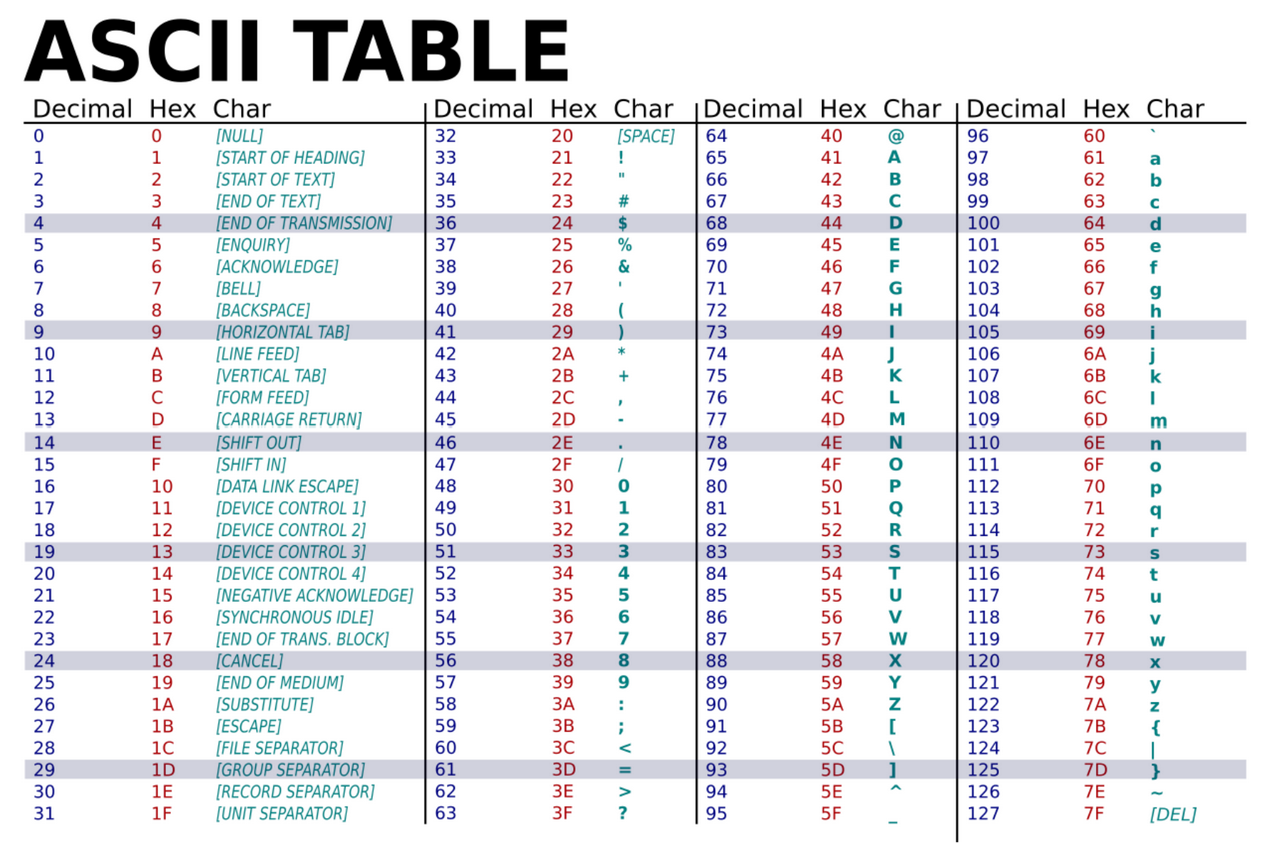
The ASCII (American Standard Code for Information Interchange) has a decimal value/representation for encoding 128 different letters, punctuation and other characters. In the age where millions of bytes of data are stored and sent across networks with a single click, it’s important to optimize the memory and time of the computers that carry out these tasks.
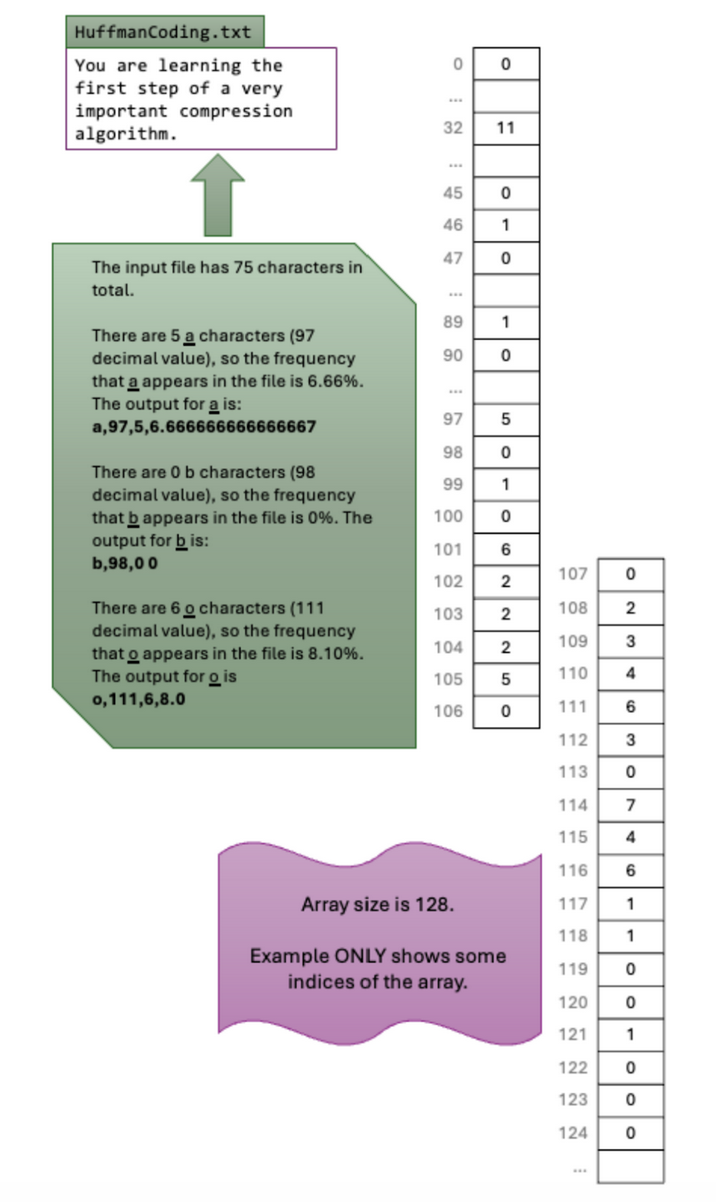
Huffman Coding is a method of data compression that counts the occurrences of each character and maps them to a certain bit string based on their frequency for optimized space.
You do not need to understand Huffman Coding for this assignment. Here are two resources if you are interested in learning more about it.
- Video about Huffman Coding Method
- More reading about Huffman
In this assignment, you will be implementing your own program that will keep track of the number of occurrences of these 128 characters. This is equivalent to the first part of the Huffman Coding algorithm.
Programming
- You will use a 1D integer array to keep track of the number of times each of the 128 characters appears in the input file.
- Then, once the entire file has been read and each character has been accounted for, you will print (only from index 32 to 126 inclusive) to the output file in the following format:
- [character],[ascii value],[occurrences],[frequency]
- NO SPACE before or after the comma.
- character: is the character itself (e.g. A, r, …).
- ascii value: is the decimal value of the character (e.g. 65, 114, …).
- occurrences: number of times the character appears in the file.
- frequency: is a percentage computed by (occurrences) / (total number of characters in the file) * 100
- [character],[ascii value],[occurrences],[frequency]
How to read one character at a time from the input file?
The first argument, args[0] will be the input file.
- Use StdIn.setFile(args[0]) to set the input file.
- Read characters while there are characters to be read from the file. StdIn.hasNextChar() returns true if there are characters to be read.
- To read one character use StdIn.readChar()
How to keep track of the number of times a character appears in the input file?
Use a 1D integer array (size 128) to keep track of the number of times each character appears in the input file.
If you look at the ASCII table you will notice that:
- The first 32 characters (0 through 31) cannot be printed. While we do count them in the total number of characters we cannot print them.
- Character 32 through 126 (inclusive) ARE the printable characters
- Notice that each character has a decimal value. The decimal value represents the numeric value that the letter is stored in the computer
- Ex. The character ‘A’ has decimal value 65.
- When you cast a char as an int, the value is the character’s decimal value.
- The println() below will print 65 when the two lines of code are executed. Try it!
- char c = ‘A’;
- System.out.println( (int) c);

Once a character is read from the file, use the decimal value of the character as the array index (cast the character as an integer).
- If for example, you read an ‘A’ , index 65 is expected to be incremented.
- If, for example, you read ‘4’, then index 52 is expected to be incremented.
This way you will be able to keep track of the number of times each character appears in the file.
How to write to the output file?
The second argument, args[1] will be the output file.
- Use StdOut.setFile(args[1]) to set the output file named “output.out”
- Then use StdOut.println() to write to the file.
Once the entire file has been read. Print to the output file (only from index 32 to 126 inclusive) in the following format:
- [character],[ascii value],[occurrences],[frequency]
- NO SPACE before or after the comma.
- Each character and its details should be on its OWN line.
Notes:
- Only modify the main method, no helper methods necessary.
- Keep track of the number of times all the character appears but only print out char values of 32 to 126 inclusive to the output file.
Executing and debugging
First navigate to the folder containing CharacterCounter.java
- to compile: javac CharacterCounter.java
- to execute: java CharacterCounter inputfilename.in output.out
*Note that there shouldn’t be terminal output. The output should be in the output.out file
Example 1:
javac CharacterCounter.java
java CharacterCounter alphabet.in output.out

Expected output:

Example 2:
javac CharacterCounter.java
java CharacterCounter bee_movie output.out

Expected output:

By Mary Buist and Anna Lu
Guidelines
Implementation Notes
- YOU MAY only update the methods with the WRITE YOUR CODE HERE line.
- COMMENT all extra testing print statements you have written from FruitCosts.java, CharacterCounter.java
- DO NOT add any instance variables to the FruitCosts.java, CharacterCounter.java class.
- DO NOT add any public methods to the FruitCosts.java, CharacterCounter.java class.
- DO NOT add/rename the project or package statements.
- DO NOT change the class name.
- DO NOT use System.exit()
VSCode Extensions
You can install the VSCode extension pack for Java. Take a look at this tutorial.
We suggest:
Importing VSCode Project
- Download A5.zip from Autolab Attachments.
- Unzip the file by double clicking or right clicking -> Unzip
- Open VSCode
- Import the folder to a workspace through File > Open Folder
Before submission
Collaboration policy. Read our collaboration policy here.
Submitting the assignment. Submit FruitCosts.java and CharacterCounter.java separately via the web submission system called Autolab. To do this, click the Assignments link from the course website; click the Submit link for that assignment.
Getting help
If anything is unclear, don’t hesitate to drop by office hours or post a question on Piazza.
- Find instructors office hours here
- Find tutors office hours in Canvas -> Tutoring
- Find head IAs office hours here
- POST on Piazza in Canvas -> Piazza
- In addition to office hours we have the CSL (Coding and Social Lounge), a community space staffed with lab assistants which are undergraduate students further along the CS major to answer questions.
- Refer to our Programming Assignments FAQ for instructions regarding our assignments and policies.
Submitting
Write the program and submit on Autolab.
- We provide a zip file (find it under on Autolab) containing FruitCosts.java, CharacterCounter.java
- For this assignment UPDATE and SUBMIT the corresponding file.
