
Assignment 6 – 60 Course Points
Students will learn about recursion and write two programs. One will recursively draw a ladder and the other will recursively draw Matryoshka dolls.
Implementation Notes
- YOU MAY only update the methods with the WRITE YOUR CODE HERE line.
- COMMENT all extra testing print statements you have written from Ladder.java, MatryoshkaDoll.java
- DO NOT add any instance variables to the Ladder.java, MatryoshkaDoll.java class.
- DO NOT add any public methods to the Ladder.java, MatryoshkaDoll.java class.
- DO NOT add/rename the project or package statements.
- DO NOT change the class name.
- DO NOT use System.exit()
1. Ladder (25 points)
Programming
In Ladder, write a recursive function createLadder that receives one parameter, an integer n containing the number of levels. The method createLadder returns a string with n levels, following these rules:
- Odd levels are denoted by |=|\n (rails/step followed by the newline character \n).
- Even levels are denoted by | |\n (rails followed by the newline character \n. The rails are separated by ONE space in between).
- The topmost level (n = 1) is the end of the ladder and is denoted by |-|\n (rails with a single dash in between, followed by the newline character \n).
- Levels are built starting from the bottom and up to the top (assume n, the number of levels, is greater than or equal to 1).
Examples below:

Notes for createLadder:
- YOUR CODE MUST BE RECURSIVE
- Do not use loops (while, do/while, or for)
- Your code must return a string without extra spaces, commas or any other character that is not in the original string
- DO NOT print anything inside the createLadder method.
We provide a test client (main method) that takes in command-line input and passes it to your createLadder method for testing. Autolab will ignore your main method and will ONLY test the recursive createLadder method.
Executing and Debugging
First navigate to the directory/folder containing Ladder.java
- To compile: javac Ladder.java
- To execute: java Ladder [n] (where n is the number of levels)
By Kal Pandit and Mary Buist
2. Matryoshka Doll (35 points)
In this assignment you will practice recursion. You will write a program to recursively generate a series of dolls to resemble the popular Russian nesting doll set, Matryoshka Dolls, which are a series of wooden dolls that are of decreasing size nested within one another.
Overview
Matryoshka Dolls are also known as nesting dolls that are of Russian origin. They consist of a set of dolls where each doll is progressively smaller than the one before such that they can be placed within one another.

As depicted here, in this assignment we will model the recurring design of the dolls as they decrease in size from left to right.
Task
- We provide a zip file (find it in Autolab) that contains MatryoshkaDoll.java
- UPDATE and SUBMIT the corresponding file.
Programming
You will write 3 functions to draw the Matryoshka Doll: main(), drawDoll(), and stackDolls().
drawDoll()
Implement the drawDoll() function to create two circles representing the doll’s body and head.
- Create a circle for the doll’s body centered at the parameters (x, y) values. The circle’s radius is given by the radius parameter.
- Create another circle as the doll’s head that is placed on top of the body. The radius of the head is expected to be 1/2 the body’s radius.
- Then call the drawFace() helper function which draws a smiley face on the doll’s head.
Note:
- Use StdDraw to draw the design. Refer to the Java file for specific information.
- Use the StdDraw.circle function to draw the doll’s body and head.
- The StdDraw canvas size is 1×1 by default (and does not need to be changed). The bottom-left corner is the origin (0,0).
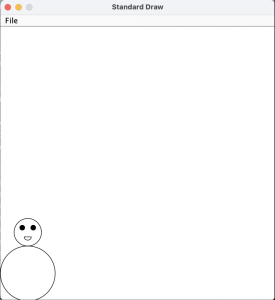
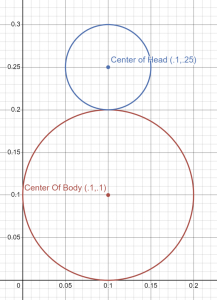
stackDolls() is a recursive function
Implement the recursive stackDolls() function that draws ONE doll and then recursively calls itself to draw more dolls. The function parameters are:
- The (x,y) body coordinate and radius of the doll this function is drawing.
- An integer that corresponds to the number of dolls to draw.
- recall that each call to stackDolls() draws one doll, so this function call accounts for 1 doll.
Steps:
- This function uses the (x, y) coordinate and radius to draw a doll,
- Then recursively calls itself to draw an adjacent doll body that is 5/7 times the size of the previous doll’s body. The function terminates when there are no dolls remaining to draw.
- Note that the dolls are adjacent to each other, the side of their bodies touch, see the images below.
main() function
The main function is the entry point of the program. This is the function that that Java Virtual Machine (JVM) calls to start execution.
- main() will read one command-line argument representing the number of dolls to be drawn.
- then, it calls the stackDolls(0.1,0.1,0.1,numberOfDolls) function to draw a succession of Matryoshka dolls on the 1×1 StdDraw Canvas.
Assume the number of dolls is greater than or equal to 0.
The following output is given when stackDolls() is called with the parameters x = 0.1, y = 0.1, r= 0.1, dolls = 5
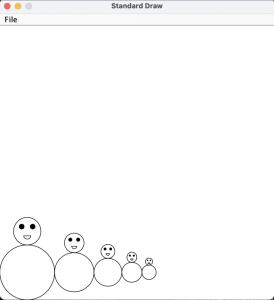
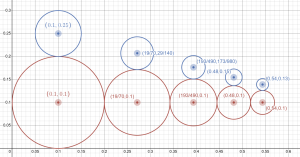
- Executing and Debugging
First navigate to the directory/folder containing MatryoshkaDoll.java- To compile: javac MatryoshkaDoll.java
- To execute: java MatryoshkaDoll [n] (where n is the number of dolls to draw)
By Pooja Kedia
Submitting Guidelines
Implementation Notes
- YOU MAY only update the methods with the WRITE YOUR CODE HERE line.
- COMMENT all testing print statements you have written from Ladder.java, MatryoshkaDoll.java
- DO NOT add any instance variables to the Ladder.java, MatryoshkaDoll.java class.
- DO NOT add any public methods to the Ladder.java, MatryoshkaDoll.java class.
- DO NOT add/rename the project or package statements.
- DO NOT change the class name.
- DO NOT use System.exit()
VSCode Extensions
You can install the VSCode extension pack for Java. Take a look at this tutorial.
We suggest:
Importing VSCode Project
- Download Assignment6.zip from Autolab Attachments.
- Unzip the file by double clicking.
- Open VSCode
- Import the folder to a workspace through File > Open Folder
Before submission
Collaboration policy. Read our collaboration policy here.
Submitting the assignment.
Submit Ladder.java and MatryoshkaDoll.java separately via the web submission system called Autolab. To do this, click the Assignments link from the course website; click the Submit link for that assignment.
Getting help
If anything is unclear, don’t hesitate to drop by office hours or post a question on Piazza.
- Find instructors office hours here
- Find tutors office hours in Canvas -> Tutoring
- Find head IAs office hours here
- POST on Piazza in Canvas -> Piazza
- In addition to office hours we have the CSL (Coding and Social Lounge), a community space staffed with lab assistants which are undergraduate students further along the CS major to answer questions.
- Refer to our Programming Assignments FAQ for instructions regarding our assignments and policies.
Submitting
Write the program and submit on Autolab.
- We provide a zip file (find it under Ladder on Autolab) containing the Ladder.java and MatryoshkaDoll.java
- For this assignment UPDATE and SUBMIT the corresponding file.
