
Conditionals and Loops – 50 course points
The purpose of this assignment is to practice conditionals and loops.
Refer to our Programming Assignments FAQ for instructions on how to install VScode, how to use the command line and how to submit your assignments.
Implementation Notes
- YOU MAY only update the methods with the WRITE YOUR CODE HERE line.
- COMMENT all extra testing print statements you have written from Hopscotch.java, DogWalker.java
- DO NOT add any instance variables to the Hopscotch.java, DogWalker.java class.
- DO NOT add any public methods to the Hopscotch.java, DogWalker.java class.
- DO NOT add/rename the project or package statements.
- DO NOT change the class name.
- DO NOT use System.exit()
Write 2 programs and submit on Autolab.
- WATCH this video: how to open the files on VSCode and how to submit into Autolab.
- We provide a zip file (find it under Hopscotch on Autolab) containing Hopscotch.java and DogWalker.java.
- For each problem UPDATE and SUBMIT the corresponding file.
- DO NOT print additional messages, follow the examples for each problem.
1. Hopscotch (25 Points)
The purpose of this assignment is to use loops and conditionals to print out the hopscotch rectangles in a specific order.
Overview
Imagine a hopscotch path made of rectangles numbered from 1 up to a given size. The path alternates between single center rectangles and pairs of left and right rectangles. Your program will print these rectangles grouped and ordered: first all the center rectangles, then all the left rectangles, and finally all the right rectangles.

Task
Write a program that prints the hopscotch’s rectangles numbers in the following order:
- Print all center rectangles in ascending order first.
- Then print all left rectangles in ascending order.
- Finally, print all right rectangles in ascending order.
Note: the center numbers follow a specific pattern, the left numbers follow a different pattern, and the right numbers follow yet another pattern.
Programming
Write the program, Hopscotch.java, that reads 1 integer argument from the command line.
- Expect the input to be an integer value greater than or equals 0.
- If the input is 0, nothing is expected to be printed.
The program is expected to first print all center rectangle numbers in ascending order, starting from 1 up to and including the largest center rectangle based on the input size. After printing all center rectangles, it should print all left rectangle numbers in ascending order, followed by all right rectangle numbers in ascending order, each determined according to the hopscotch pattern based on the input size.
UPDATE and SUBMIT Hopscotch.java in AutoLab.
Expected Output
For Hopscotch 10:
1 4 7 10 2 5 8 3 6 9
For Hopscotch 11:
1 4 7 10 2 5 8 11 3 6 9
For Hopscotch 0:
(no output)
Pre-conditions
- The input is an integer greater or equals to 0 (zero).
You may assume the inputs follow the pre-condition, no validation code is required.
Executing and Debugging
- First navigate to the Assignment3 directory/folder
- To compile: javac Hopscotch.java
- To execute: Hopscotch [any number]
- Output should be: (*see the examples above*)
By Ram Buditi
2. DogWalker (25 points)
Programming
Imagine that your dog’s collar has a tag that allows you to monitor how much exercise your dog is getting from their daily walk (safely with someone).
- This program will simulate the behavior of a dog walker, and your dog, moving randomly in the city.
Imagine that the city is a two-dimensional grid of points. At each step, the walker randomly moves 1 unit north (up), south (down), east (right), or west (left) with probability equal to 1/4 for each direction, independent of previous moves. You will use Math.random() to generate a random number between 0.0 (inclusive) and 1.0 (non-inclusive) to simulate the probability.
- Write a program DogWalker.java that takes an integer command-line argument n and simulates the motion of a walker randomly taking n steps.
- Print the location at each step (including the starting point), treating the starting point as the origin (0, 0). Each step should be on its own line. Output formatting will be as follows: the coordinates of each step taken by the dog within a pair of parenthesis where the x and y coordinate are separated by a comma and NO SPACES. For example: (2,0)
- Also, print the square of the final Euclidean distance from the origin as a double. The Euclidean distance lets you know how far from the starting point (home) your dog is after n steps. Output the words “Squared distance= ” followed by your distance.
 where x_final, y_final are your last x- and y-coordinates, and x_initial, y_initial are your starting x- and y-coordinates.
Note:
- You do not need arrays for this problem; keep track of the x and y coordinates during the random walk.
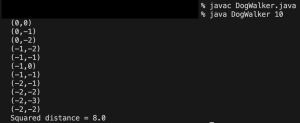
- In the example below the walker takes 20 steps; there are 21 printed locations. The first location is the starting point (0,0). Because this is random, your numbers may not be the same.
Executing and Debugging
From the folder containing DogWalker.java:
javac DogWalker.java
java DogWalker 20
(0,0)
(0,1)
(-1,1)
(-1,2)
(0,2)
(1,2)
(1,3)
(0,3)
(-1,3)
(-2,3)
(-3,3)
(-3,2)
(-4,2)
(-4,1)
(-3,1)
(-3,0)
(-4,0)
(-4,-1)
(-3,-1)
(-3,-2)
(-3,-3)
Squared distance = 18.0

Created by: Ayden Lyubimov
Guidelines
Implementation Notes
- YOU MAY only update the methods with the WRITE YOUR CODE HERE line.
- COMMENT all extra testing print statements you have written from Hopscotch.java, DogWalker.java
- DO NOT add any instance variables to the Hopscotch.java, DogWalker.java class.
- DO NOT add any public methods to the Hopscotch.java, DogWalker.java class.
- DO NOT add/rename the project or package statements.
- DO NOT change the class name.
- DO NOT use System.exit()
VSCode Extensions
You can install the VSCode extension pack for Java. Take a look at this tutorial.
We suggest:
Importing VSCode Project
- Download Assignment3.zip from Autolab Attachments.
- Unzip the file by double clicking or right clicking -> Unzip
- Open VSCode
- Import the folder to a workspace through File > Open Folder
Before submission
Collaboration policy. Read our collaboration policy here.
Submitting the assignment. Submit Hopscotch.java and DogWalker.java separately via the web submission system called Autolab. To do this, click the Assignments link from the course website; click the Submit link for that assignment.
Getting help
If anything is unclear, don’t hesitate to drop by office hours or post a question on Piazza.
- Find instructors office hours here
- Find tutors office hours in Canvas -> Tutoring
- Find head IA’s office hours here
- POST on Piazza in Canvas -> Piazza
- In addition to office hours we have the CSL (Coding and Social Lounge), a community space staffed with lab assistants which are undergraduate students further along the CS major to answer questions.
- Refer to our Programming Assignments FAQ for instructions regarding our assignments and policies.
Submitting
Write the program and submit on Autolab.
- We provide a zip file (find it under Hopscotch on Autolab) containing Hopscotch.java, DogWalker.java
- For this assignment UPDATE and SUBMIT the corresponding file.
