
Assignment 4 – 60 Course Points
The purpose of this assignment is to familiarize students with arrays, loops, and conditionals in Java.
Implementation Notes
- YOU MAY only update the methods with the WRITE YOUR CODE HERE line.
- COMMENT all extra testing print statements you have written from RuBusStop.java, EgyptianPyramid.java
- DO NOT add any instance variables to the RuBusStop.java, EgyptianPyramid.java class.
- DO NOT add any public methods to the RuBusStop.java, EgyptianPyramid.java class.
- DO NOT add/rename the project or package statements.
- DO NOT change the class name.
- DO NOT use System.exit()
1. RU Bus Stop (30 points)
The purpose of this assignment is to teach students how to compare chars from user input.
Overview
Serena, a freshman at Rutgers just finished her Intro to Logic class and needs to switch campuses for her Intro to Computer Science class. She is currently standing at the bus stop, waiting patiently for the bus to arrive. Your job is to help Serena find in which order her desired bus will arrive!
All bus routes’ names are 1 character in length. We cannot have B/L or REXB routes.
See Rutgers bus routes below, where some are fictitious.
- A Route
- B Route
- C Route
- E Route
- F Route
- H Route
- L Route
- R Route
- X Route
Programming
Write the program RuBusStop.java that reads n char arguments from the command line.
- The first n-1 characters refer to the order in which the buses will arrive at the bus stop.
- The last char refers to the bus Serena is waiting for.
The program displays the order in which the bus Serena is waiting for will arrive. If the bus Serena is waiting for does not stop at the bus stop then the program displays -1.
To read the first character from the command line use:
char c = args[0].charAt(0);
To read the nth character from the command line use:
char c = args[n-1].charAt(0);
You will have to read an undetermined number of characters, so you will need a loop to read all characters from the command line.
Precondition:
- All the inputs are char values.
- All characters are UPPERCASE
Note:
- Read the first n-1 values and store them into a char 1D array. Then, read the last char and search for that value in the array.
- The program should print the position of the first bus that matches the one you are searching for.
Executing and Debugging
- to compile: javac RuBusStop.java
- to execute: java RuBusStop X X X X
- Output should be: #
Example 1:
javac RuBusStop.java
java RuBusStop C L H H
3
The first bus to arrive is C, followed by L, then H. The program displays 3 because H is the third bus to arrive.
Example 2:
javac RuBusStop.java
java RuBusStop B R X B
1
The first bus to arrive is B, followed by R, then X. The program displays 1 because B is the first bus to arrive.
Example 3:
javac RuBusStop.java
java RuBusStop B C E A B H L
-1
The L bus does not stop at the bus stop, so the program displays -1.
Author: Manya Sood
2. Egyptian Pyramid (30 points)
Long ago, some advanced civilizations such as the Egyptians modeled their architecture to be of pyramid form: 3-dimensional polyhedra with some polygon base and triangle-shaped flat sides meeting to a point at the top. For the sake of this assignment, we will be considering 2-D pyramids, which take the form of triangles. Students will be tasked with understanding and implementing 2D array(s) to create a 2-Dimensional pyramid of their own.
Overview
Oh no! During Professor Goel’s 2D Arrays lecture, a mysterious portal opened, sucking all the CS111 students into another time dimension. It looks like the students are trapped in 2580 B.C. After some conversing (let’s assume due to advanced language translation technology that students happened to bring), they discover that the Egyptians need assistance in building their pyramids. Since Professor Goel did not time travel with the CS111 students, it’s now up to them to help these Egyptians out.
The students need to code a program-taking in two tentative parameters from the terminal representing 1) the overall size of their figure and 2) the number of bricks provided-to build a pyramid.
Programming
Create and use a 2D array to create the pyramid. Bricks, denoted by the symbol ‘X’ (capital X), should be placed beginning at the bottom left and continue until either
1) we run out of bricks or
2) the pyramid is complete.
The surrounding area should be filled with the symbol ‘=’. Be sure to include a statement detailing the number of bricks remaining, in the format listed below. Keep in mind that the output should be PRINTED into the terminal.
Precondition:
- The two inputs, size of the pyramid and number of bricks are both >0
Note:
- Make sure to include “# Bricks Remaining” after printing out the pyramid (like it shows in the screenshots), where # is replaced by the number of bricks remaining after building the pyramid
Executing and Debugging
From the folder containing EgyptianPyramid.java:
- to compile: javac EgyptianPyramid.java
- to run: java EgyptianPyramid # #
Example 1:
javac EgyptianPyramid.java
java EgyptianPyramid 3 1
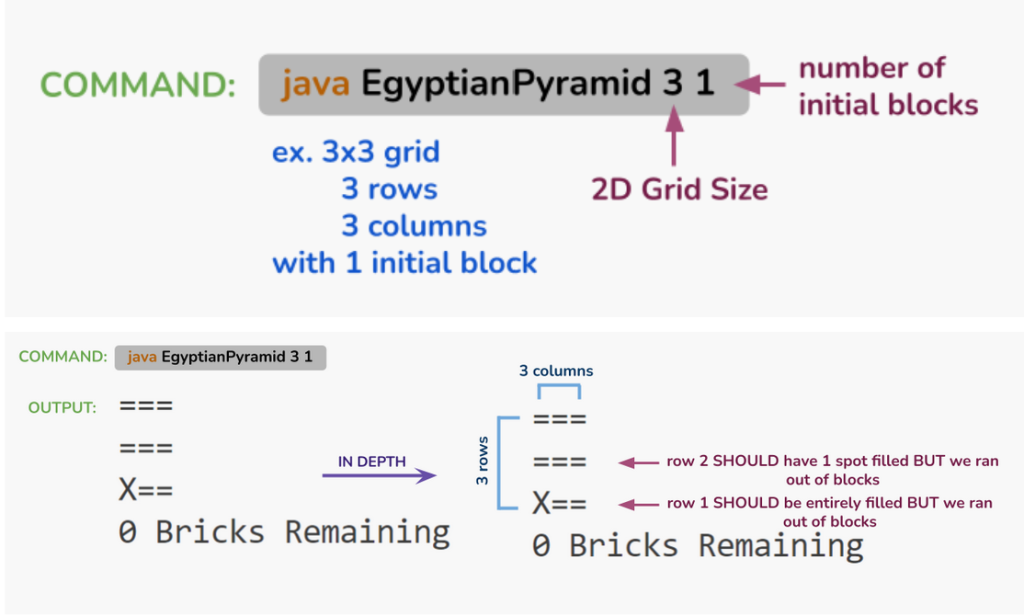
Expected output: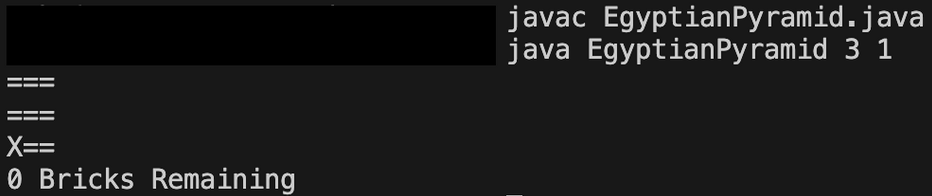
Example 2:
javac EgyptianPyramid.java
java EgyptianPyramid 4 5
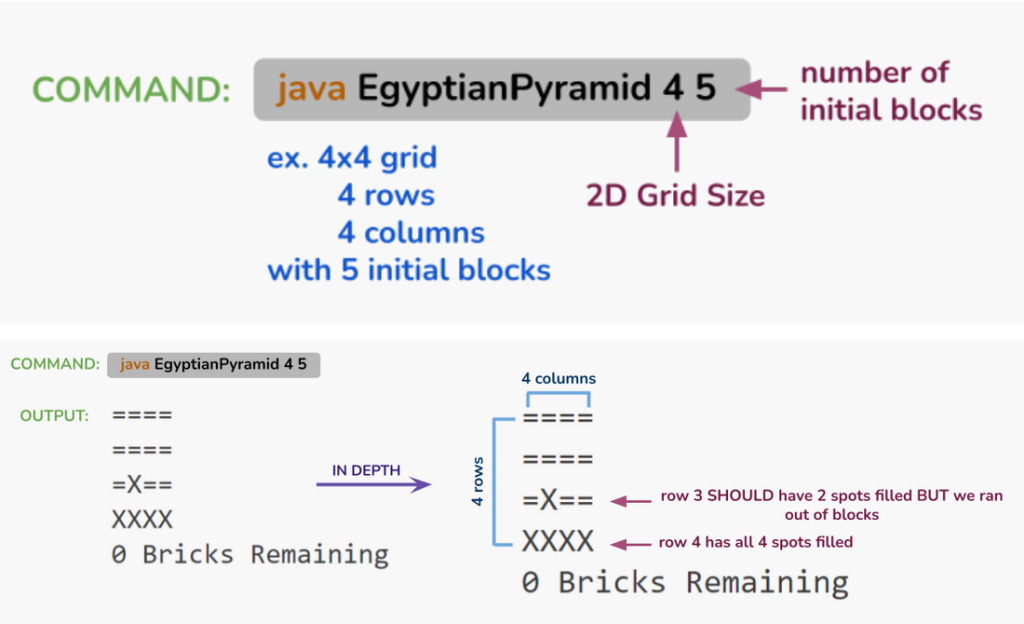
Expected output: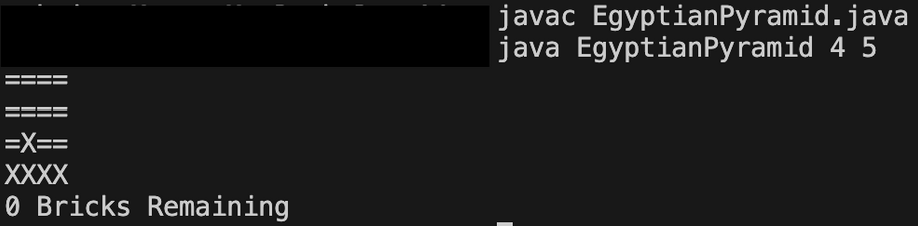
Example 3:
javac EgyptianPyramid.java
java EgyptianPyramid 5 16
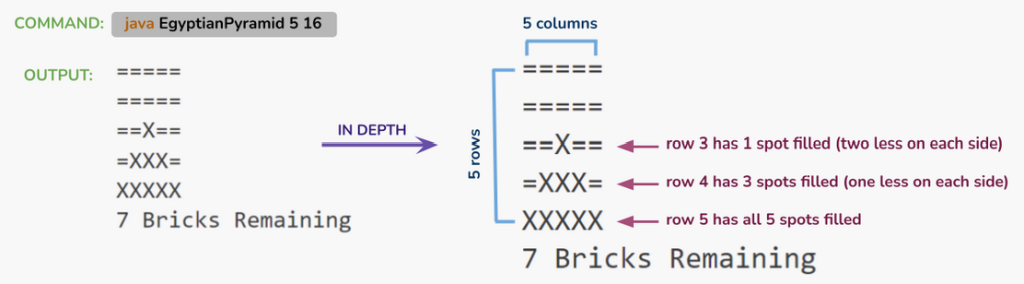
Expected output: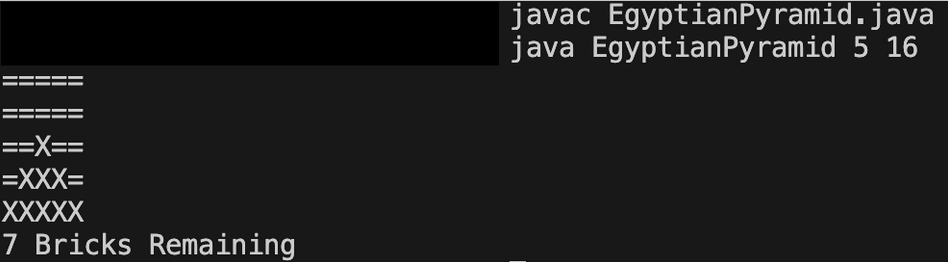
Author Credit Kushi Sharma and Ayla Muminovic
Guidelines
Implementation Notes
- YOU MAY only update the methods with the WRITE YOUR CODE HERE line.
- COMMENT all extra testing print statements you have written from RuBusStop.java, EgyptianPyramid.java
- DO NOT add any instance variables to the RuBusStop.java, EgyptianPyramid.java class.
- DO NOT add any public methods to the RuBusStop.java, EgyptianPyramid.java class.
- DO NOT add/rename the project or package statements.
- DO NOT change the class name.
- DO NOT use System.exit()
VSCode Extensions
You can install the VSCode extension pack for Java. Take a look at this tutorial.
We suggest:
Importing VSCode Project
- Download Assignment4.zip from Autolab Attachments.
- Unzip the file by double clicking or right clicking -> Unzip
- Open VSCode
- Import the folder to a workspace through File > Open Folder
Before submission
Collaboration policy. Read our collaboration policy here.
Submitting the assignment. Submit RuBusStop.java and EgyptianPyramid.java separately via the web submission system called Autolab. To do this, click the Assignments link from the course website; click the Submit link for that assignment.
Getting help
If anything is unclear, don’t hesitate to drop by office hours or post a question on Piazza.
- Find instructors office hours here
- Find tutors office hours in Canvas -> Tutoring
- Find head IAs office hours here
- POST on Piazza in Canvas -> Piazza
- In addition to office hours we have the CSL (Coding and Social Lounge), a community space staffed with lab assistants which are undergraduate students further along the CS major to answer questions.
- Refer to our Programming Assignments FAQ for instructions regarding our assignments and policies.
Submitting
Write the program and submit on Autolab.
- We provide a zip file (find it under RU Bus Stop on Autolab) containing RuBusStop.java, EgyptianPyramid.java
- For this assignment UPDATE and SUBMIT the corresponding file.
