
Assignment 5
The purpose of this assignment is for students to practice 1D and 2D arrays.
1. Squid Game Glass Bridge (30 points)
In this assignment you will simulate a path across a glass bridge. You will determine whether the player survives crossing the bridge based on a provided sequence of steps and the bridge’s tile safety.
Overview
You are given 2-rows of glass bridges with 10 tiles. Each tile on the bridge is either safe (true) or unsafe (false). A sequence of 20 boolean values (10 pairs of true or false) will describe the safety of the left (L) and right (R) panel for each tile. For example, if the input is “true false false true true false false etc.” Then the bridge would look like this:

You are also given a path which simulates the player’s steps through the bridge. The path consists of exactly 10 characters (L or R, indicating which side the player chooses to step on at each column of the glass bridge).
Programming
Write a program, GlassBridge.java, that:
- Create a 2D boolean array: boolean[2][10] to store the bridge.
- Row 0 corresponds to the left panels.
- Row 1 corresponds to the right panels.
- Each column represents a left (row 0) and a right (row 1) tile.
- Create a 1D char array: char[10] to store the path.
- This simulates the player stepping through the bridge.
- Read input from the command-line.
- Read 20 Booleans (true/false) and store them into the 2D bridge array column by column.
- Read 10 characters (L or R) and store them into the 1D path array.
- To read character values, use: args[#].charAt(0)
- Example: char firstChar = args[4].charAt(0);
- Hint: Check which index in args the path steps start at (see diagram).
- Iterate over the path to determine its safety.
- “L” in the path refers to row 0 of the bridge.
- “R” in the path refers to row 1 of the bridge.
- Evaluate the safety:
- If all selected tiles are true, display “safe”.
- If any tile is false, display “unsafe”.
Example for inputting the glass bridge:
The first 20 arguments are booleans (10 pairs of true or false). These booleans describe the safety of the glass bridge. The boolean values are space separated. Read them from left to right.
- The first item in the pair corresponds to row 0 (Left panel).
- The second item in the pair corresponds to row 1 (Right panel).
If the first 20 arguments are “false true true false true false false true true true true true true false true false true false true false”, the bridge array looks like this (F means false and T means true): *updated 10/18 @7pm

Therefore, false goes in bridge[0][0], true goes in bridge[1][0], and then the next true goes in bridge[0][1], etc. So you take the tile value inputs and insert them column by column.
Example for inputting the path:
After the 20 booleans there will be 10 characters (L or R) corresponding to the path.
- L represents a left step on the glass bridge (row 0)
- R represents a right step on the glass bridge (row 1)
The characters are space separated. Read them from left to right.
If the path 10 characters are “L R R R L L R R L R”, the path array will look like this:

The first ‘L’ will be placed at path[0], the next character ‘R’ will be placed at path[1], the next character ‘R’ will be placed at path[2], and so on.
Executing and Debugging
- First navigate to the Assignment5 directory/folder
- to compile: javac GlassBridge.java
- to execute: java GlassBridge [input]
- Output should be: (*see the examples below*)
Example 1:
args array


javac GlassBridge.java
java GlassBridge true false true false false true false true true false false true true false false true false true false true L L R R L R L R R R
Expected Output:
Safe
Example 2:
javac GlassBridge.java
java GlassBridge false true false true true false false true false true true false false true false true true false false true R R L R R L L R L R
Expected Output:
Unsafe
Example 3:
javac GlassBridge.java
java GlassBridge true false false true true false false true true false false true true false false true false true false true L R L R R R L R L R
Expected Output:
Unsafe
Assignment created by Ved Patel
2. Block Blast (30 points)
In this assignment, you will be implementing a simple version of the game Block Blast, which functions similarly to Tetris in a 2D square grid. You will be using 2D Arrays with nested for loops and conditionals to implement the gameplay of Block Blast, as you continuously place blocks within the grid to accumulate points until no additional blocks can be placed and the game is over.
Programming
You are tasked with filling in the missing Block Blast game functionality in BlockBlast.java.
The gameGrid is a 2D boolean array that represents the game board where false are empty spots and true are blocks.


The block pieces are also 2D boolean arrays.
- The 2D array for blocks is smaller than the 2D array for the gameGrid.
- This allows us to place several blocks in the gameGrid.

You will complete four tasks. In the main method inside BlockBlast.java, you will see numbers for each of the tasks you need to complete as follows:
- Initialize the boolean
gameGridto be a 2D array of sizeargs[0] x args[0].So, if
args[0]contains the value 5 then the 2D array size is 5 x 5.- Provided code in between:
- Chooses
currentBlockto be a random game block to be placed in the gameGrid. - Then we provide
// TESTING PRINT STATEMENT FOR CHOOSING NEW BLOCK. - Prints out random game block for user to see.
- CAREFUL: comment out the printing of the Current Block before submission.
- Chooses
- Provided code in between:
- After a new block is randomly generated (named
currentBlock), write the logic to place the new block.- Traverse through the
gameGridto find an open spot (open spots contain false).- Start at [0][0] and traverse the grid row-wise.
- Once you find an open spot, compare the surrounding gameGrid blocks to the currentBlock and see if it will fit.
- HINT: keep in mind array bounds!
- If
currentBlockfits, place it on the gameGrid by setting totrueall the cells where the block is placed. - If you traverse the entire gameGrid and have not placed the block, end the game and break.
- To end the game, assign
falsetogameActiveand break out of the loop.
- To end the game, assign
- Provided code in between:
- We provide
// TESTING PRINT STATEMENT FOR TASK 2. - Prints the
gameGridand game score. - CAREFUL: comment out the printing of the gameGrid and score before submission.
- We provide
- Traverse through the
- After the new block is placed, write the logic to clear completed rows and/or columns keeping track of how many lines have been cleared.
A completed row has
truein every column. A completed column hastruein every row.- Search for completed rows first: traverse the gameGrid searching for completed rows; marking down which rows are complete if any.
- Then search for completed columns: traverse the gameGrid searching columns; marking down which columns are complete if any.
- Lastly, traverse the gameGrid clearing complete rows and columns.
- Provided code in between:
- We provide
// TESTING PRINT STATEMENT FOR TASK 3. - Prints the
gameGridand game score. - CAREFUL: comment out the printing of the gameGrid and score before submission.
- We provide
- After clearing complete rows and columns, increment the score based on the number of rows/columns completed.
- Each completed row/column is worth 10 points towards the player’s total score.
Provided code in between:- We provide
// TESTING PRINT STATEMENT FOR TASK 4. - Prints the
gameGridand game score. - CAREFUL: comment out the printing of the gameGrid and score before submission.
- We provide
- Each completed row/column is worth 10 points towards the player’s total score.
Gameplay Examples
Example 1: Our program begins by initializing a 2D boolean array with all values set to false. In this example, say args[0] = 5. Our board starts like this:
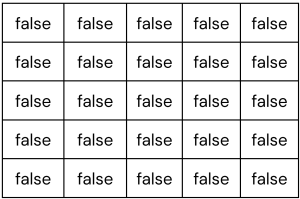
In the code provided to you, one of the six game pieces will be randomly selected. Your code will need to find the location in the array to insert the piece. In this example, let’s say the first piece to be inserted will be a small square. After inserting, the board would look like this:

There are no filled rows or columns, so we move on to the next piece. Say our randomly selected piece to insert is a horizontal line:

After inserting the horizontal line, we now have a full row, so it would get cleared (and we would adjust the score). Note that if there were any complete columns, they would get cleared, too, before another piece gets inserted:

The next random piece is another horizontal line! It would get inserted at index [0][0]:
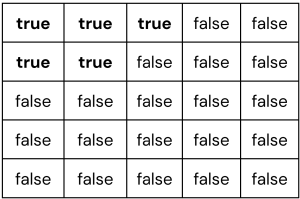
The next random piece is a z-shape. First, we find the next empty index (in this case, when you’re at index [0][2]). Then, we then attempt to insert the piece. So, our z-shape gets inserted like so:

The game will continue until we cannot insert any additional pieces.
Example 2: A 4 x 4 grid looks like this after placing 1 Small Square.

After a vertical line is placed results in the following grid, where column 2 is full.

After column 2 is cleared results in the following grid.

Executing and Debugging
- You can run your program through VSCode or you can use the Terminal to compile and execute. We suggest running through VSCode because it will give you the option to debug.
- How to debug your code
- If you choose the Terminal:
- first navigate to BlockBlast directory/folder
- to compile: javac BlockBlast.java
- to execute: java BlockBlast [n]
- the output: will be in the form of
- Make sure you uncomment the sections when testing “// TESTING PRINT STATEMENTS. YOU MUST COMMENT OUT UPON SUBMISSION” through “// END OF TESTING PRINT STATEMENTS”
- Make sure you instantiative gameGrid (this means filling out values for each gameIndex)
- Make sure you uncomment the section when submitting “// Final board state. Uncomment this upon submission” through ”// End of final board print out”
Execution Examples:
When testing print statements are uncommented:


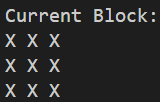
⇒ ATTENTION: When submitting, test print statements are Commented.
Only the last print is left.

Example 2:
When testing print statements are uncommented:


⇒ ATTENTION: When submitting, test print statements are COmmented.
Only the last print is left.


Assignment created by Sarah Benedicto and Ram Buditi
Guidelines
Implementation Notes
- YOU MAY only update the methods with the WRITE YOUR CODE HERE line.
- COMMENT all print statements you have written from GlassBridge.java, BlockBlast.java
- DO NOT add any instance variables to the GlassBridge.java, BlockBlast.java class.
- DO NOT add any public methods to the GlassBridge.java, BlockBlast.java class.
- DO NOT add/rename the project or package statements.
- DO NOT change the class name.
- DO NOT use System.exit()
VSCode Extensions
You can install the VSCode extension pack for Java. Take a look at this tutorial.
We suggest:
Importing VSCode Project
- Download Assignment5.zip from Autolab Attachments.
- Unzip the file by double clicking.
- Open VSCode
- Import the folder to a workspace through File > Open Folder
Before submission
Collaboration policy. Read our collaboration policy here.
Submitting the assignment. Submit GlassBridge.java, BlockBlast.java via Autolab. To do this, click the Assignments link from the course website; click the Submit link for that assignment.
Getting help
If anything is unclear, don’t hesitate to drop by office hours or post a question on Piazza.
- Find instructors office hours here
- Find tutors office hours in Canvas -> Tutoring, RU CATS
- Find head TAs office hours here
- POST on Piazza in Canvas -> Piazza
- In addition to office hours we have the CSL (Coding and Social Lounge), a community space staffed with lab assistants which are undergraduate students further along the CS major to answer questions.
- Refer to our Programming Assignments FAQ for instructions regarding our assignments and policies.
Submitting
Write the program and submit on Autolab.
- We provide a zip file (find it under Assignment5 on Autolab) containing the GlassBridge.java, BlockBlast.java files.
- For this assignment UPDATE and SUBMIT the corresponding file.
