
Assignment 7
1. Matryoshka Doll (30 points)
In this assignment you will practice recursion. You will write a program to recursively generate a series of dolls to resemble the popular Russian nesting doll set, Matryoshka Dolls, which are a series of wooden dolls that are of decreasing size nested within one another.
Overview
Matryoshka Dolls are also known as nesting dolls that are of Russian origin. They consist of a set of dolls where each doll is progressively smaller than the one before such that they can be placed within one another.

As depicted here, in this assignment we will model the recurring design of the dolls as they decrease in size from left to right.
Task
- We provide a zip file (find it in Autolab) that contains Matryoshka.java.
- UPDATE and SUBMIT the corresponding file.
Programming
You will write 3 functions to draw the Matryoshka Doll: main(), drawDoll(), and stackDolls().
drawDoll() is an iterative function
Implement the drawDoll() function to create two circles representing the doll’s body and head.
- create a circle for the doll’s body centered at the parameters (x, y) values. The circle’s radius is given by the radius parameter.
- create another circle as the doll’s head that is placed on top of the body. The radius of the head is expected to be 1/2 the body’s radius.
- then call the drawFace() helper function which draws a smiley face on the doll’s head.
Note:
- Use StdDraw to draw the design. Refer to the Java file for specific information.
- Use the StdDraw.circle function to draw the doll’s body and head.
- The StdDraw canvas size is 1×1 by default (and does not need to be changed). The bottom-left corner is the origin (0,0).
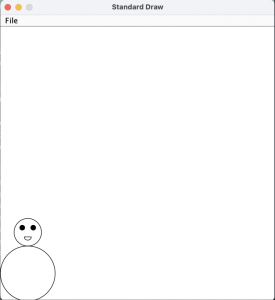
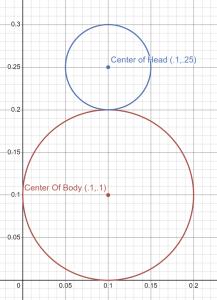
stackDolls() is a recursive function
Implement the recursive stackDolls() function that draws ONE doll and then recursively calls itself to draw more dolls. The function parameters are:
- the (x,y) body coordinate and radius of the doll this function is drawing.
- an integer that corresponds to the number of dolls to draw.
- recall that each call to stackDolls() draws one doll, so this function call accounts for 1 doll.
Steps:
- this function uses the (x, y) coordinate and radius to draw a doll,
- then recursively calls itself to draw an adjacent doll body that is 5/7 times the size of the previous doll’s body. The function terminates when there are no dolls remaining to draw.
- Note that the dolls are adjacent to each other, the side of their bodies touch, see the images below.
main() function
The main function is the entry point of the program. This is the function that that Java Virtual Machine (JVM) calls to start execution.
- main() will read one command-line argument representing the number of dolls to be drawn.
- then, it calls the stackDolls(0.1,0.1,0.1,numberOfDolls) function to draw a succession of Matryoshka dolls on the 1×1 StdDraw Canvas.
The following output is given when stackDolls() is called with the parameters x = 0.1, y = 0.1, r= 0.1, dolls = 5
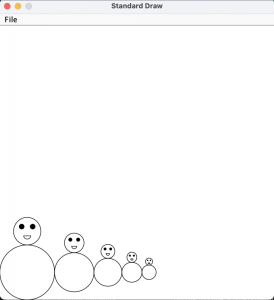
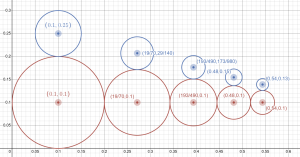
- Executing and Debugging
First navigate to Matryoshka directory/folder- to compile: javac Matryoshka.java
- to execute: java Matryoshka [n] (where n is the number of dolls to draw)
By Pooja Kedia
——————————————————————————————————————————————————————————————————————
2. Fireboy and Watergirl (30 points)
Welcome to the Fireboy and Watergirl assignment! In this assignment you will practice recursion in combination with previously learned concepts.
Start your assignment early! You need time to understand the assignment and to answer the many questions that will arise as you read the description and the code provided.
Refer to our Programming Assignments FAQ for instructions on how to install VSCode, how to use the command line and how to submit your assignments.
Overview
In this assignment, you will implement a recursive function using conditionals to check for safe paths forward. This assignment simulates the Fireboy and Watergirl game, and your program is meant to find a safe path by checking for any hazards and if so, moving the character back until they can find another path forward. This pattern continues until both characters find the exit.
In the original Fireboy and Watergirl game, both characters have hazards to avoid and diamonds to collect. In your program, both characters must avoid the green goo. Fireboy can walk through lava and will collect fire diamonds but must avoid water. Watergirl can walk through water and will collect water diamonds but must avoid lava.
Implementation
Overview of files provided
- FireboyAndWatergirl.java – You will complete one function within the FireboyAndWatergirl class to implement the game functionality. You will submit this file to Autolab.
- Multiple input files are included; they store example mazes including an integer representing the dimension of the maze followed by characters representing each maze cell’s contents. You are welcome to create your own input files, as they will not be submitted to Autolab.
FireboyAndWatergirl.java
- DO NOT add new import statements.
- DO NOT change any of the method’s signatures.
Methods given to you:
main()
The input file contains the maze’s dimension d in the first line and d lines with d characters:
‘F’ = lava; only Fireboy can step here.
‘W’ = water; only Watergirl can step here.
‘N’ = neutral; both characters can step here.
‘G’ = green goo; neither character can step here.
This function reads in the input file to create the char[][] maze array.
It also creates two arrays:
- fireboyVisited: boolean 2D array to represent fireboy’s visited path.
- watergirlVisited: boolean 2D array to represent watergirl’s visited path.
Then, it calls nextStep() for Fireboy and then for Watergirl.
- Calls the nextStep method for Fireboy printing Fireboy’s final path.
- Calls the nextStep method for Watergirl printing Watergirl’s final path.
Methods to be implemented by you:
nextStep()
This is a recursive function that determines if the current cell (row, col) can be visited by the hero, and then visits the neighboring cells. The nextStep method returns when no other step can be taken.
A cell can only be visited once.
- If a cell (r,c) has already been visited, then collectedDiamonds[r][c] is true.
Base case – determine if the current cell can be visited:
- The hero input will be FIREBOY or WATERGIRL.
- The maze array is used to determine if the hero can step in the current cell (row, col) according to the following rules:
- ‘F’ = lava; only Fireboy can step here.
- ‘W’ = water; only Watergirl can step here.
- ‘N’ = neutral; both characters can step here.
- ‘G’ = green goo; neither character can step here.
- Ensure that (row, col) are within the maze array bounds.
- Ensure that (row, col) has not been visited yet.
- If the current cell (row, col) has been visited, then collectedDiamonds[row][col] is true.
- If the current cell (row, col) cannot be visited, return.
The recursive step – the nextStep method attempts a step until no other step can be taken.
- Take the step, mark collectedDiamonds[row][col] true.
- Call nextStep() four times on neighboring cells in the following order
- Down: the cell immediately down the current cell.
- Left: the cell to the left of the current cell.
- Up: the cell above the current cell.
- Right: the cell to the right of the current cell.
For example, here is the result that should show after running:
***Updated 11/11 @12:30am, 11/18@4pm: You need to make sure that line endings are in the LF format. (Open the command palette (CTRL+SHIFT+P) -> type “Change All End Of Line Sequence” -> choose LF). Please see the “A7 Maze Discrepancy” announcement Canvas.
javac FireboyAndWatergirl.java
java FireboyAndWatergirl maze1.txt

These are the steps that the hero took to get there (below shows the terminal if a student prints out each step taken)
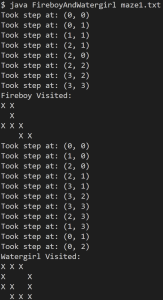
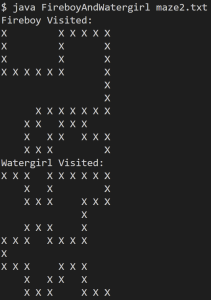
For example, here is the result that should show after running:
javac FireboyAndWatergirl.java
java FireboyAndWatergirl maze2.txt
Executing and Debugging
- You can run your program through VSCode or you can use the Terminal to compile and execute. We suggest running through VSCode because it will give you the option to debug.
- How to debug your code
- If you choose the Terminal:
- first navigate to Assignment7 directory/folder
- to compile: javac FireboyAndWatergirl.java
- to run: FireboyAndWatergirl [filename]
- first navigate to Assignment7 directory/folder
By Sarah Benedicto and Juliania Shyprykevych
Submitting Guidelines
Implementation Notes
- YOU MAY only update the methods with the WRITE YOUR CODE HERE line.
- COMMENT all testing print statements you have written from Matryoshka.java, FireboyAndWatergirl.java
- DO NOT add any instance variables to the Matryoshka.java, FireboyAndWatergirl.java class.
- DO NOT add any public methods to the Matryoshka.java, FireboyAndWatergirl.java class.
- DO NOT add/rename the project or package statements.
- DO NOT change the class name.
- DO NOT use System.exit()
VSCode Extensions
You can install the VSCode extension pack for Java. Take a look at this tutorial.
We suggest:
Importing VSCode Project
- Download Assignment7.zip from Autolab Attachments.
- Unzip the file by double clicking.
- Open VSCode
- Import the folder to a workspace through File > Open Folder
Before submission
Collaboration policy. Read our collaboration policy here.
Submitting the assignment. Submit each JAVA FILE via Autolab. To do this, click the Assignments link from the course website; click the Submit link for that assignment.
Getting help
If anything is unclear, don’t hesitate to drop by office hours or post a question on Piazza.
- Find instructors office hours here
- Find tutors office hours in Canvas -> Tutoring, RU CATS
- Find head TAs office hours here
- POST on Piazza in Canvas -> Piazza
- In addition to office hours we have the CSL (Coding and Social Lounge), a community space staffed with lab assistants which are undergraduate students further along the CS major to answer questions.
- Refer to our Programming Assignments FAQ for instructions regarding our assignments and policies.
Submitting
Write the program and submit on Autolab.
- We provide a zip file (find it under Assignment7 on Autolab) containing the Java FILES.
- For this assignment UPDATE and SUBMIT the corresponding file.
