
Assignment 8 – RURacing (80 points)
Welcome to the RU Racing assignment! This assignment introduces you to the practical implications of different algorithmic time complexities through a simulated race. Your goal is to implement the logic for four distinct racing strategies, each corresponding to a common time complexity: O(N), O(N²), O(log N), and O(N log N).
You will primarily work within the RURacing.java file to see your implementations in action.
Refer to our Programming Assignments FAQ for instructions on how to install VSCode, how to use the command line, and how to submit your assignments.
Overview
In 2062, Professors Sesh and Merkel both created a groundbreaking quantum teleportation device called the ScarletTeleporter. The purpose of the ScarletTeleporter is to move objects instantly across space using quantum entanglement. Many small scale simple tests have been conducted with the device, such as teleporting professor Sesh’s lunch across his lab. Until now, they wanted to use the ScarletTeleporter in a more practical way, Rutgers transportation. The ScarletTeleporter allows the students to travel around campus instantaneously.
There is a catch that comes with the device, it uses a large amount of energy. The amount of energy that the device uses depends on the efficiency of the algorithm. The better the algorithm, the less energy that is used. With this in mind, the department thought they could make a great educational opportunity and created the Algorithmic Grand Prix. The Algorithmic Grand Prix is a competition that helps students understand firsthand how algorithmic efficiency has real and physical consequences.
The Racers:
- StarbucksTruck (ST): This racer represents an O(N²) time complexity. The truck takes N actions to charge but can only traverse one space at a time. This means that this racer is reliable, but inefficient for long distances.
- NLogNExpress (NLOGN): This racer has an O(N log N) efficiency. The NLogNExpress uses a hybrid strategy. Before each teleport, it must spend N actions charging its quantum batteries (just like the slowest racers). However, once charged, it can leap a distance that doubles with every jump. For example, the first jump covers 1 space, second jump covers 2 spaces, third jump covers 4 spaces, and so on. This means each jump covers exponentially more ground, but each requires a full recharge. The racer starts off slow but ramps up in speed quickly.
- ScarletKnight (SK): This racer demonstrates O(N) linear time complexity, steadily advancing one step at a time without needing to charge. While it is consistent, this approach lacks the advantage of longer jumps.
- LogNExpress (LOGN): This racer demonstrates O(log N) logarithmic time complexity. It can double its teleportation distance with each jump without charging, allowing it to cover ground exponentially faster. For example, the first jump covers 1 space, the second jump covers 2 spaces, the third jump covers 4 spaces, fourth jump covers 8 spaces, and so on.
Implementation Notes
- Download the assignment zip file from Autolab. It contains the necessary starter code, including RURacing.java, Racer.java, Driver.java, Track.java, RacerHistory.java, and track files directory.
- Your task is to implement the methods marked with //WRITE YOUR CODE HERE in RURacing.java ONLY.
- You can (and should) use the provided Driver.java to test and visualize your implementations.
- Submit only your modified RURacing.java file to Autolab.
- DO NOT add any import statements
- DO NOT add the project statement
- DO NOT change the class name
- DO NOT change the headers of ANY of the given functions
- DO NOT add any new class fields
- DO NOT use System.exit()
Understanding the Key Files
While you will only be modifying RURacing.java, understanding these files is crucial:
- RURacing.java: THIS IS THE FILE YOU WILL EDIT. It orchestrates the race simulation and contains the stubs for the methods you need to implement. It initializes the racers with their respective strategies and charge times.
- Racer.java: Defines the Racer object. You will not modify this file, but you must use its methods to control racer actions and access their state.
Key Racer methods for your implementation:- void chargeBattery(): Consumes one action to increase the battery level by 1. Throws an error if the battery is already full.
- void useScarletTeleporterTM(int distance): Consumes one action to move the racer forward by distance steps. Resets the battery to 0. Throws an error if the battery is not fully charged or if the move is invalid.
- int getBattery(): Returns the current charge level.
- int getChargeTime(): Returns the actions needed for a full charge (this is N for O(N²) and O(N log N) racers).
- int getDistance(): Returns the total distance traveled so far.
- Track getTrack(): Returns the Track object. Use racer.getTrack().getLength() to get the total track length (N).
- long getActionsCount(): Returns the total number of actions this racer has taken.
- boolean hasFinishedRace(): Checks if the racer completed the lap (traveled full distance).
- String getName(): Returns the racer’s name (e.g., “ScarletKnight”).
- CRITICAL RULE: In each turn, a racer can perform ONLY ONE function: either chargeBattery() OR useScarletTeleporterTM(). Your strategy implementations must adhere to this.
- Driver.java: The graphical interface. You will not modify this file. Run this file to start the GUI.
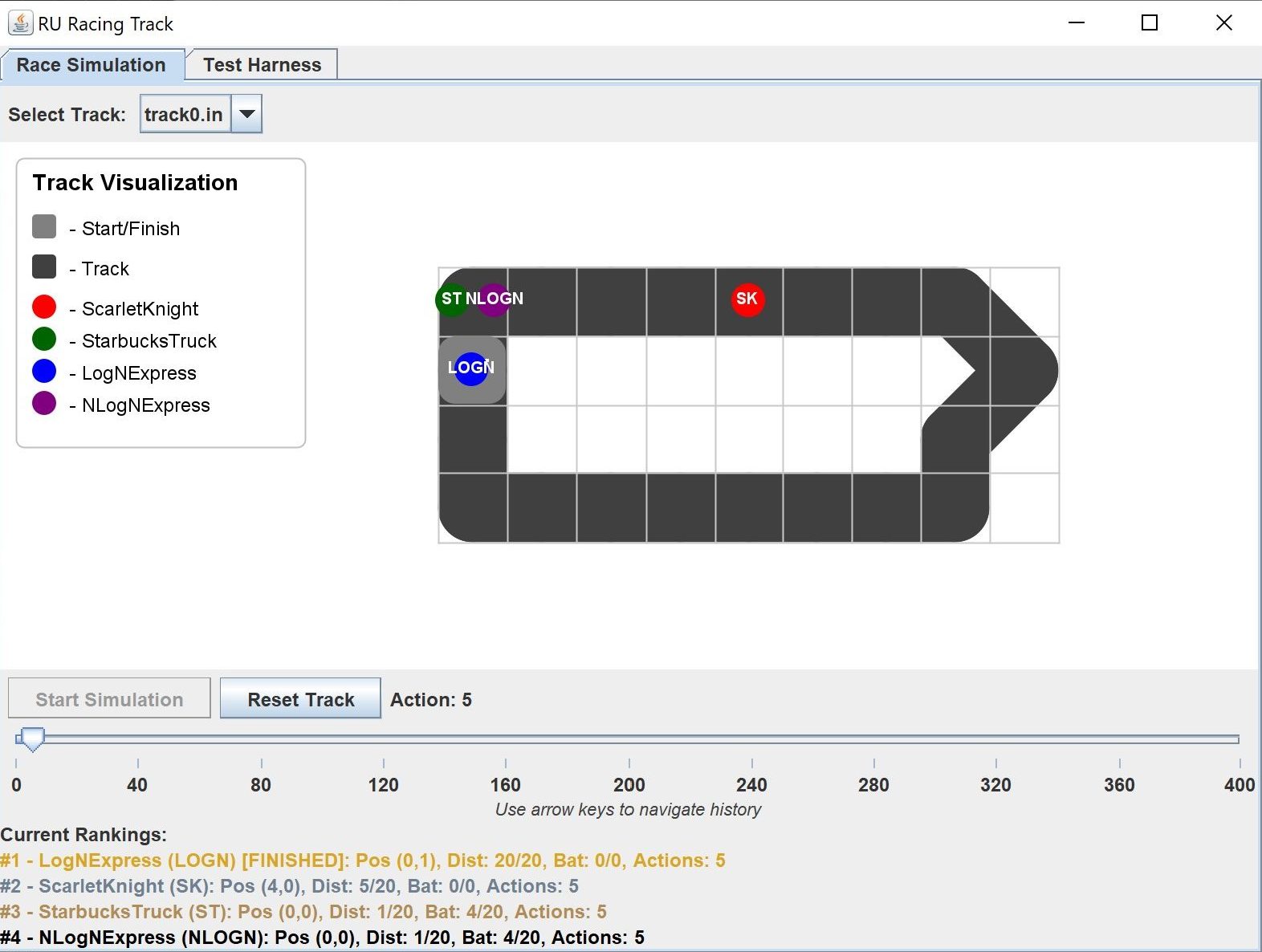
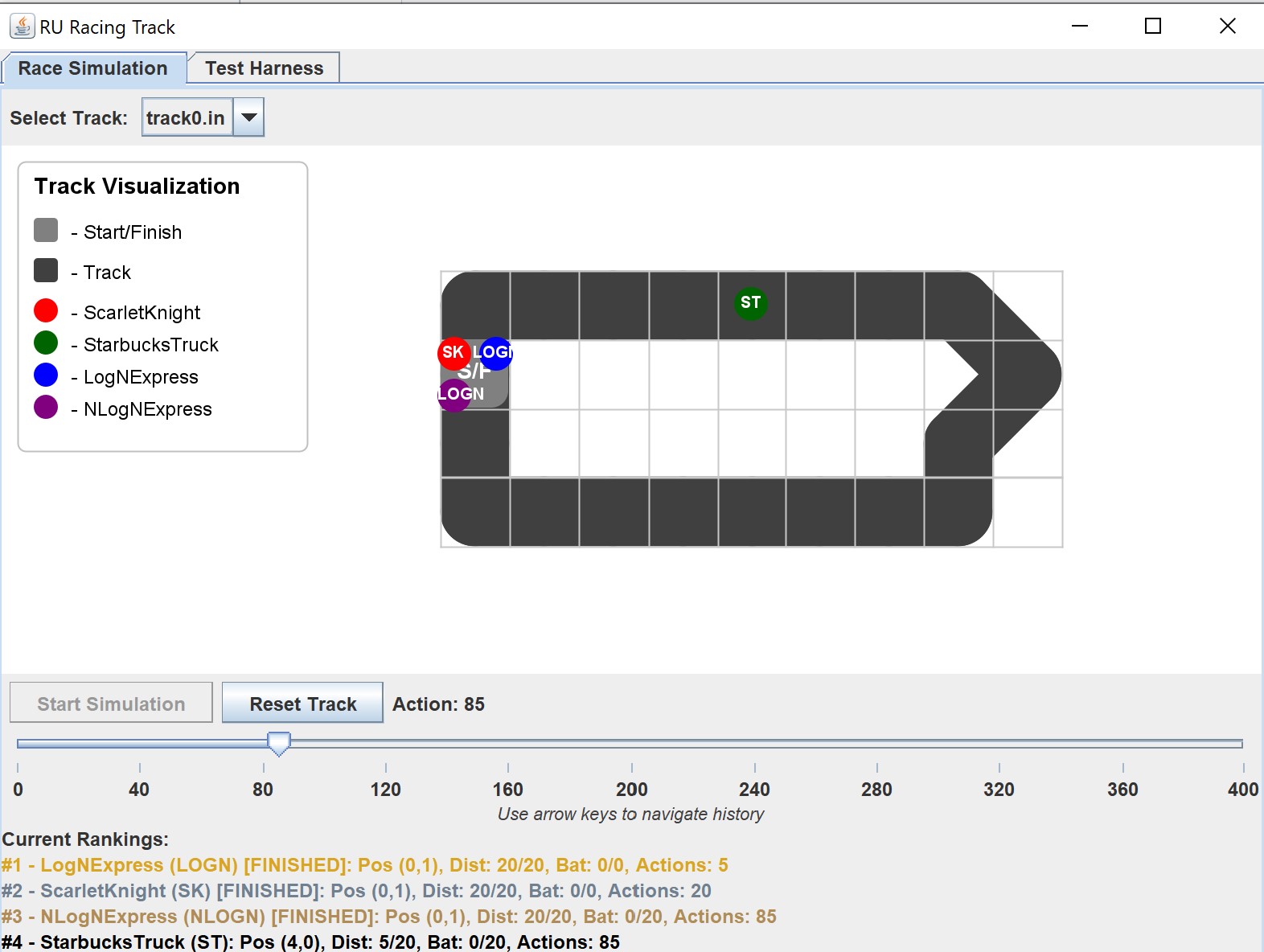
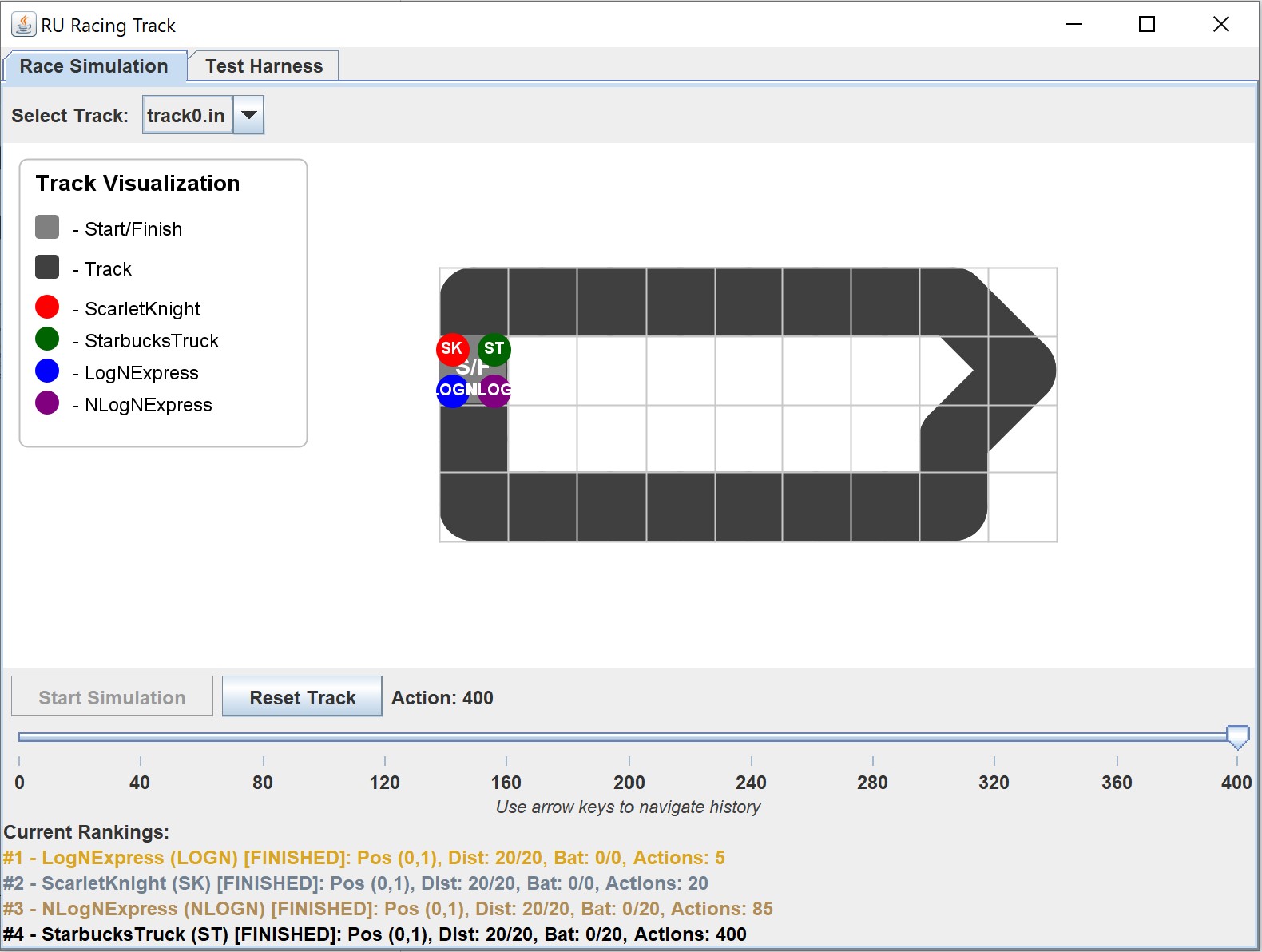
- Usage: Select a track from the dropdown, click “Start Simulation”. After the race, use the slider (or arrow keys) to review the race action by action. The panel below the slider displays racer rankings and stats for the selected action.
- Zoom: Use the mouse wheel while hovering over the track display to zoom in and out.
- Pan: Click and drag with the middle mouse button (or the left mouse button) on the track display to pan the view.
- Reset View: The “Reset Track” button also resets the zoom and pan to the default view.
- Debugging: If your code has errors, the GUI will often display a message indicating the likely source.
- Usage: Select a track from the dropdown, click “Start Simulation”. After the race, use the slider (or arrow keys) to review the race action by action. The panel below the slider displays racer rankings and stats for the selected action.
- Track.java: Represents the track layout and properties (like length).
- RacerHistory.java: Used internally by the GUI for playback.
Your Task: Implement Methods in RURacing.java
Implement the following methods in RURacing.java. Replace //WRITE YOUR CODE HERE with your code for the respective method.
Methods for you to implement:
applyStarbucksTruckAction(Racer racer) – O(N²) Strategy
- Goal: Charge for N actions, then move 1 step. Repeat.
- Charge Time: N (Same as track length).
- Action Logic:
- Check if the battery is full using getBattery() and getChargeTime().
- If full: Move the racer forward by 1 step.
- If not full: Charge the battery. (see Key Racer methods for what method charges the battery)
Testing:

applyScarletKnightAction(Racer racer) – O(N) Strategy
- Goal: Move 1 step per action.
- Charge Time: 0 (No charging needed).
- Action: Move the racer forward by 1 step each action.
Testing: 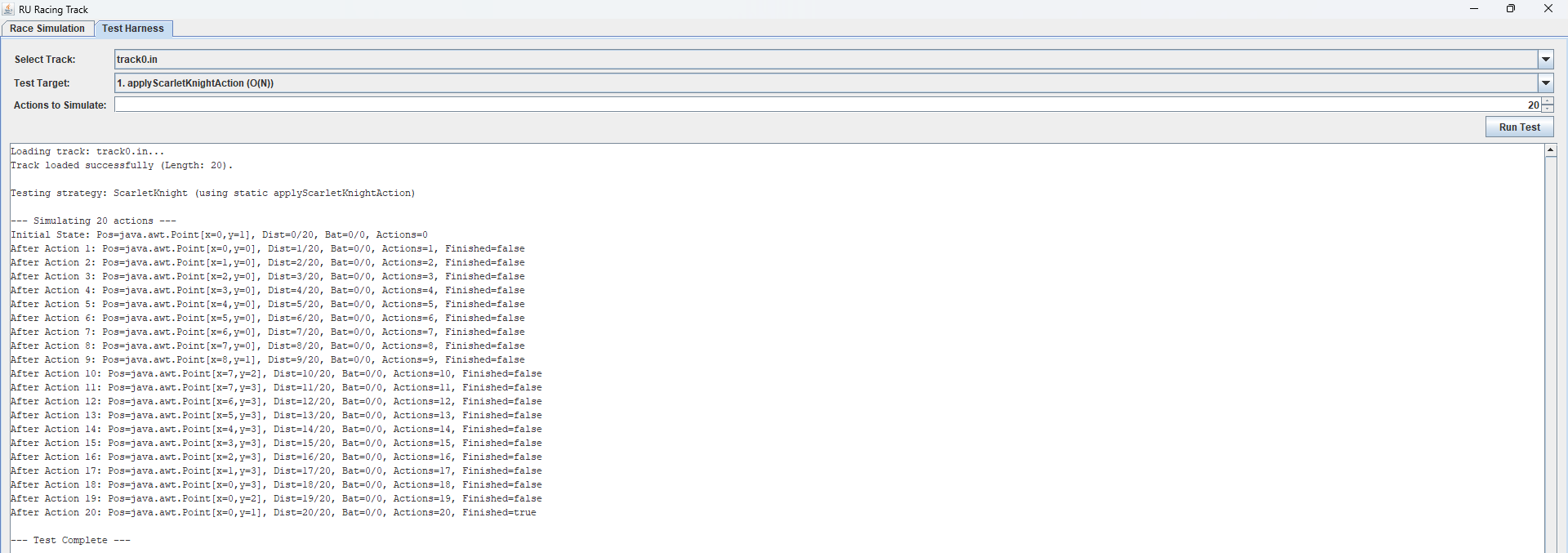
applyNLogNExpressAction(Racer racer) – O(N log N) Strategy
- Goal: Charge for N actions, then teleport distances of 1, 2, 4, 8, … (powers of 2). Repeat.
- Charge Time: N (Same as track length).
- Action Logic:
- Check if the battery is full using getBattery() and getChargeTime().
- If not full: Charge the battery. (see Key Racer methods for what method charges the battery)
- If full: Calculate the appropriate distance to move based on how many jumps have already been completed.
- To find the next jump look at the total distance a racer has already covered. We want to know roughly “2 raised to what power k is close to the total distance traveled so far?”.
- In Java, Math.log(x) calculates the natural logarithm (base e). To get base-2 we use the standard math formula log_2(x) = log(x) / log(2).
- Calculating (int) (Math.log(racerDistance) / Math.log(2)) represents the exponent of the last power-of-2 jump completed. The (int) part just drops any decimal, giving us the whole number.
- Make sure the racer doesn’t move beyond the track length.
- Move the racer by the determined distance.
Handle the case where the racer hasn’t moved yet separately (first jump should be distance 1).
Always ensure the racer moves at least 1 step when teleporting if it hasn’t finished the race yet.
Testing: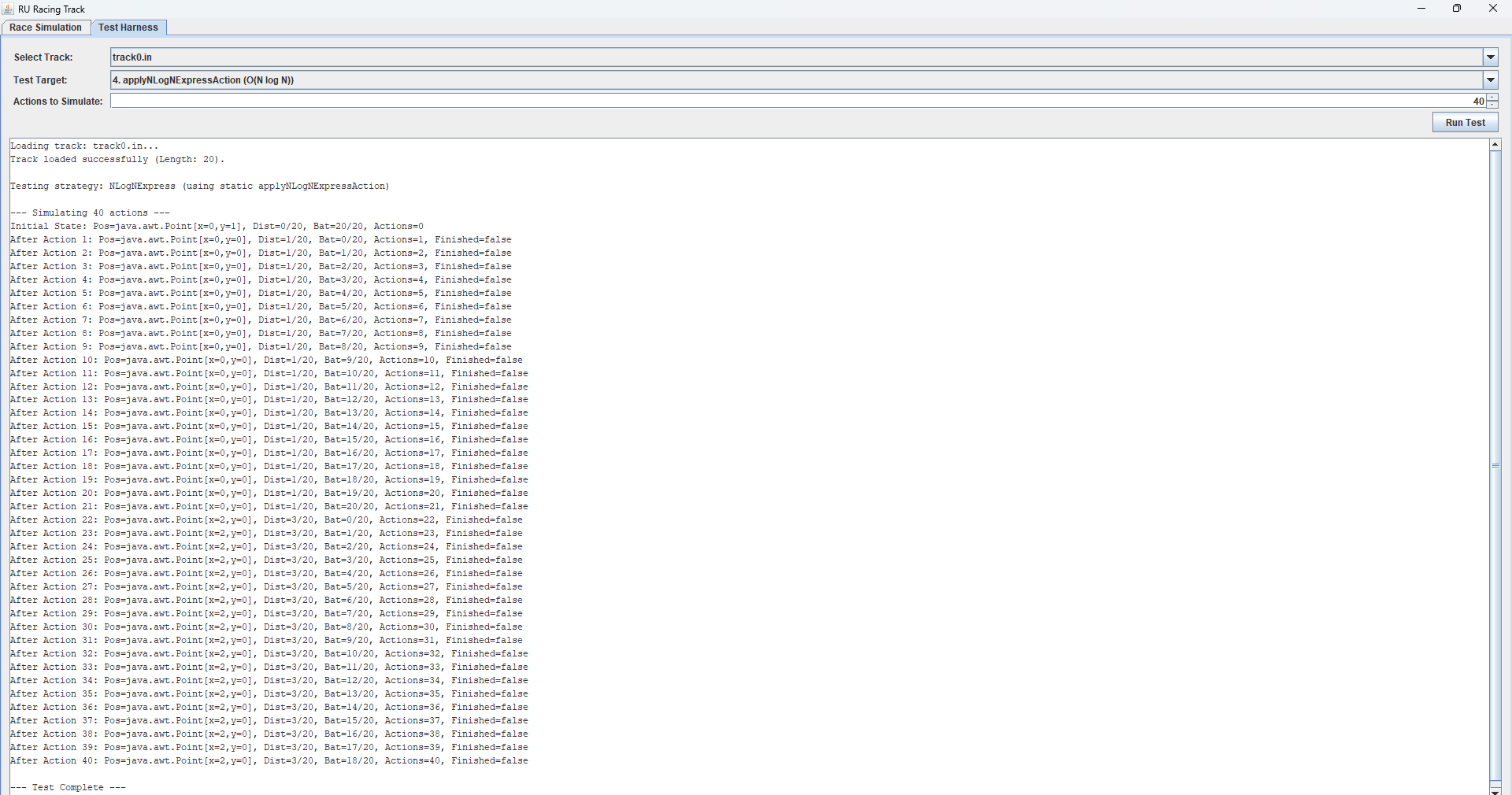
applyLogNExpressAction(Racer racer) – O(log N) Strategy
- Goal: Teleport distances of 1, 2, 4, 8, … (powers of 2) with no charging.
- Charge Time: 0 (No charging needed).
- Action Logic:
- Calculate the appropriate distance to move for this action, which should be a power of 2 based on which action it is.
- Make sure the racer doesn’t move beyond the track length by comparing the calculated distance with the remaining distance.
- Move the racer by the determined distance.
Always ensure the racer moves at least 1 step if it hasn’t finished the race yet.

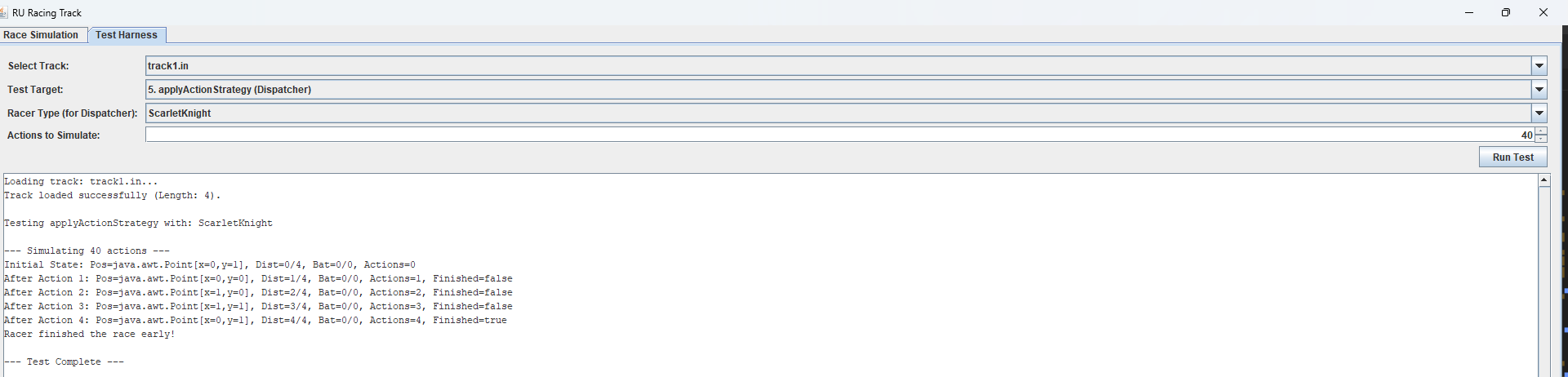
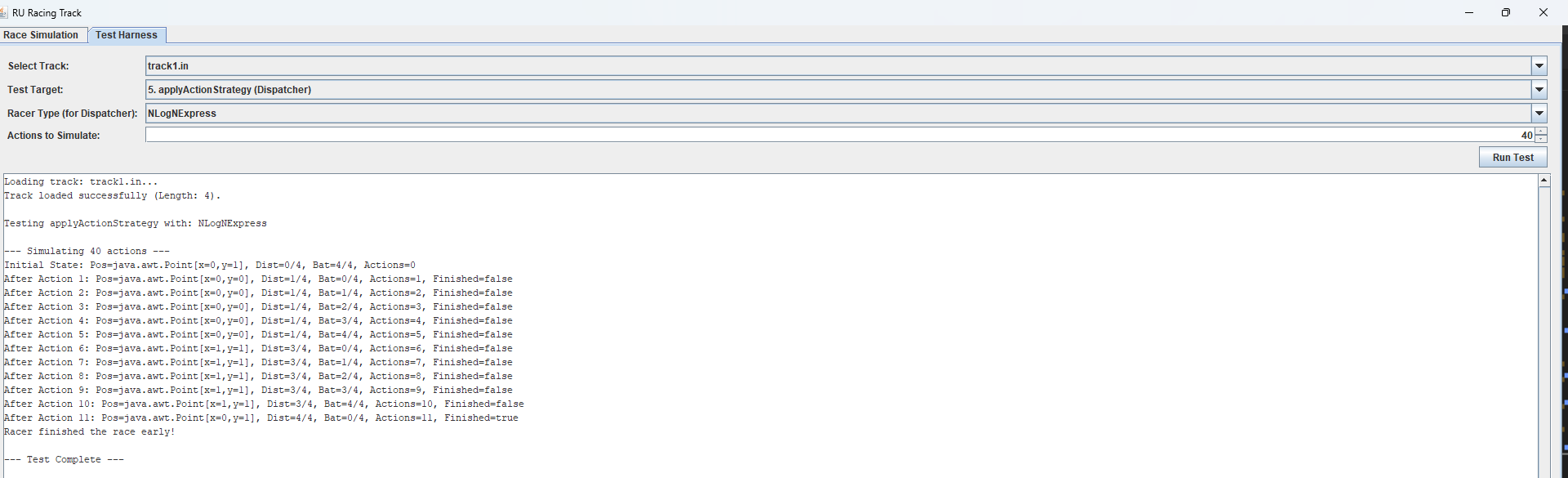
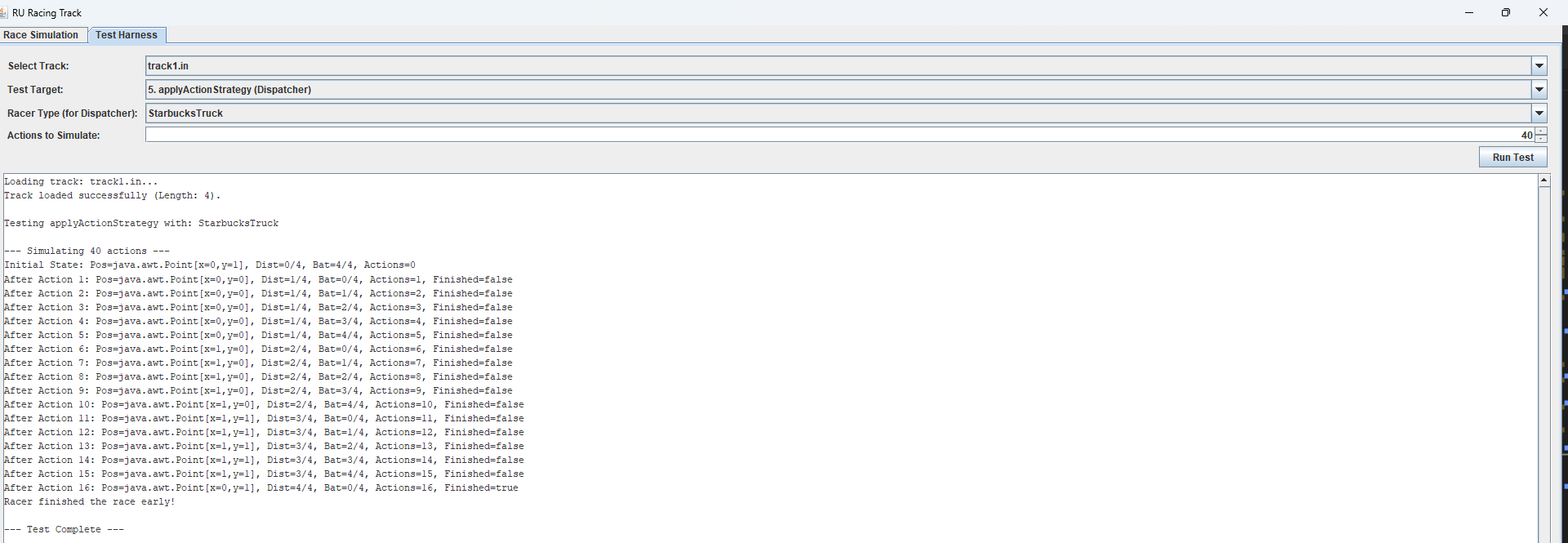
applyActionStrategy(Racer racer)
- This method determines which racer-specific strategy to apply based on the racer’s name.
- Use a conditional structure (switch or if-else) to call the appropriate strategy method for each racer type based on their name.
- The racer names are: “ScarletKnight”, “StarbucksTruck”, “LogNExpress”, and “NLogNExpress”.
Testing: *this will test a combination of all the previous methods. Here are more examples

rankRacers(ArrayList racers)
- This static method sorts the provided list of racers based on their performance.
- Ranking Criteria:
- Primary: Greatest distance traveled (getDistance())– Racers that traveled farther should be ranked higher
- Secondary (Tie-breaker): Fewest actions taken (getActionsCounts()) – Racers with fewer actions should be ranked higher. *Hint: Math.min might be helpful here
- You can implement this using any basic sorting algorithm (insertion sort). One approach is to iterate through the list and reorder it based on the criteria above.
- You may want to use the following Java code:
- racers.get(index) // gets the object at the specified index of the list
- racers.set(index, object) // sets the object at the specified index of the list
Testing:


simulateRace(long cutoff)
- This method contains the main simulation loop.
- Keep track of how many actions have been simulated.
- In each iteration of the main loop:
- Check if all racers have finished or if the maximum action count (cutoff) has been reached.
- For each racer that hasn’t finished, apply its action strategy using applyActionStrategy.
- Keep track of whether all racers have finished to know when to stop the simulation.
- After the simulation is complete, rank the racers using rankRacers and return the result.
Testing:
* To watch a video of the full simulation click *here* (Note: the video uses emojis to represent the different racers, but the colors remain the same.)
You can see the racers move according to their runtime which is really cool!!!

Executing and Debugging
- You can run your program through VSCode or you can use the Terminal to compile and execute. We suggest running through VSCode because it will give you the option to debug.
- Test each method as you go with the directions under each method
- How to debug your code. You will have to create a launch.json file and configure it correctly (Run -> Add Configuration).
- If you choose the Terminal:
If you prefer to compile and run the project from the command line:- Navigate to the Project Root: Open your terminal or command prompt and change the directory to the root folder of theRURacingproject (the folder containing the source files and input files).
cd path/to/A8
- Compile: Use the javac command.
# Compile
javac *.java - Run: Use the java command.
# Run
java Driver
- Navigate to the Project Root: Open your terminal or command prompt and change the directory to the root folder of theRURacingproject (the folder containing the source files and input files).
- If you choose the Driver:
- Click the play button in the top right corner when you’re on the Driver file
By Elian Deogracia-Brito, Tiara Clyde and Tanvi Yamarthy
Before submission
Collaboration policy. Read our collaboration policy here.
Submitting the assignment
Submit RURacing.java separately via the web submission system called Autolab. To do this, click the Assignments link from the course website; click the Submit link for that assignment.
Getting help
If anything is unclear, don’t hesitate to drop by office hours or post a question on Piazza.
- Find instructors office hours here
- Find tutors office hours on Canvas -> Tutoring
- Find head TAs office hours here
- In addition to office hours we have the Coding and Social Lounge (CSL) , a community space staffed with lab assistants which are undergraduate students further along the CS major to answer questions.
